Once here you will be prompted to enter your email address, then you will be emailed a OTP (one time code) which will link your device to your account, meaning you do not have to log in again on this device.
Accessing your tickets (In-person attendees)
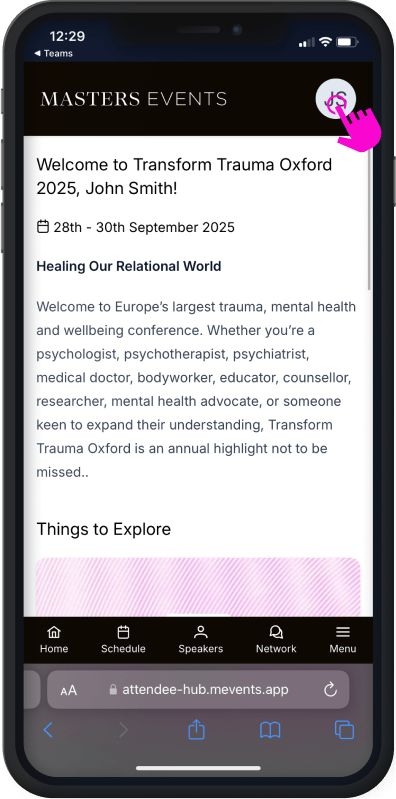
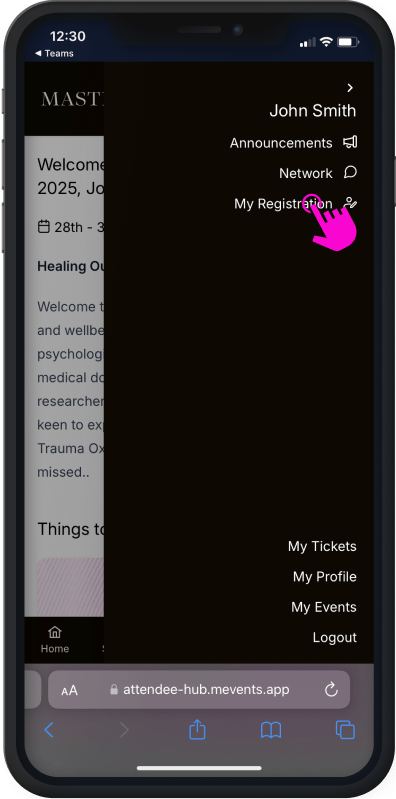
To find your tickets, simply click the profile menu icon in the top right corner. From here a menu will open and you can find “My Tickets” towards the bottom of the menu.
Entering the event
To enter the events, simply click the profile menu icon in the top right corner. From here a menu will open and you can find “My Events” towards the bottom of the menu.
Click through and select “Transform Trauma Oxford 2025”
Completing onboarding
The first time you enter the event screen, you may be presented with an onboarding screen. Please follow the steps to fill in your profile details and complete your registration if you haven’t already done so.
Viewing the event schedule
To view the schedule, simply click the ‘Schedule’ icon from the navigation at the bottom of the screen. Here you will find all of the sessions for the conference. Once a session goes live a “Join session” button will appear on the session, this will take you to the live stream.
After a session has finished the schedule will automatically update with a “View replay” button.
Logging attendance for LIVE CE/CME credits
We are working with joint accreditation partner CME Outfitters, LLC to offer live and enduring CE credits for specific sessions at Transform Trauma Oxford. Not all sessions are accredited with CE credit, so please refer to schedule inside the Web app which can be filtered by accredited sessions.
To log your attendance for live CE/CME credits you must join a session while it is live and click the ‘Claim CE Credits’ button. Once clicked your attendance is logged and you have four weeks to return and complete the process.
Completing live CE/CME credit claim
Once you have claimed the live CE/CME credit during a live session, you have four weeks to return to the session and follow the unique link to the CME outfitters website.
To access the questionaire later:
Go back into the attended session in the event platform
Click on ‘Watch Replay’
Click on the link through to the CME Outfitters, LLC website.
Important:
You must do this for each session you would like to claim credit for.
To be eligible for LIVE credit, you must have logged your attendance (i.e. click ‘Claim CE Credits’) during the live session.
Finding or changing your registration
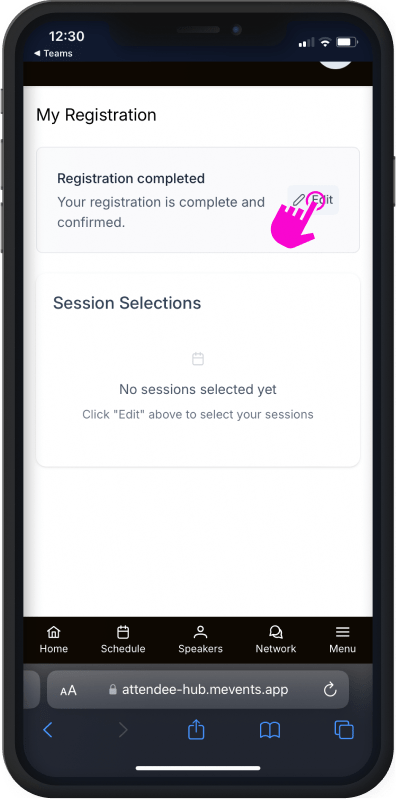
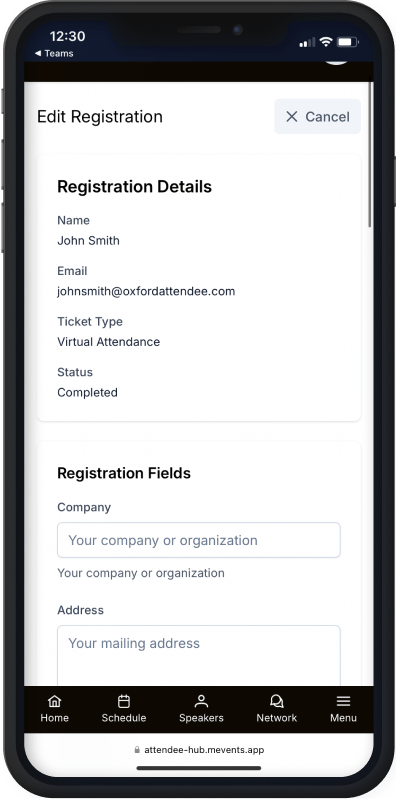
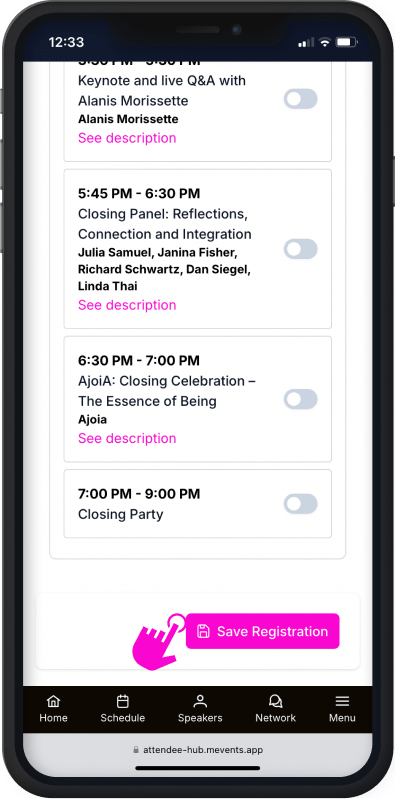
To find your registration, enter the Transform Trauma Oxford 2025 event. Click the Profile Icon in the top right and a menu will load, on this menu you will find “My Registration”, click into here and you will find a button that says “edit registration”.
Important: Once you have made your selections be sure to click “Save registration”
Please note that changing from a session will not save your space in that session and you may lose it.
What's included in the app?
Applies to virtual and in-person attendees.
Watch all session livestreams and playbacks
Log attendance for CE/CME credits
Connect and chat with other attendees
Visit the Exhibition Hall
Closed Captions on all Livestreams
View your personal schedule
Stay up to date, with in-app announcements
View event maps
Shopping Cart
Scroll to Top
Select an immersion Day
Please select one Immersion Day from the list below to include with your package. You will receive an in person ticket for the selected immersion day, and virtual access to the full conference, including 90 days of recordings, with your purchase
Trauma, Attachment, and Neuroscience with Bessel & Licia